

ENSCAPE IMPACT : Sustainable Design on Demand

Enscape Impact add-on is designed to integrate building performance analytics into design process early stages. This powerful tool empowers architects and designers to make informed decisions that enhance both the efficiency and sustainability of their projects.

Sustainability is now a key focus in architecture and design, and early energy analysis plays a vital role in creating efficient, cost-effective, and environmentally responsible buildings. By considering energy performance from the start, projects can avoid costly late-stage changes, meet regulations, and stay true to the original design vision. This approach not only streamlines the process but also delivers better outcomes for clients.

The Enscape Impact add-on brings building performance analytics into the early stages of design, giving architects and designers the insights they need to make smarter, more sustainable decisions.


Get Quote

Key Features

REAL-TIME ENERGY MODELING

Enscape Impact allows users to perform fast energy modeling simulations directly within their design environment. This feature provides immediate insights into key performance metrics, such as energy consumption and carbon emissions, enabling designers to optimize their projects from the earliest stages.

Animated Enscape Impact Design Workflow

INTEGRATED WORKFLOW

The add-on integrates with Enscape, leveraging the live workflow with popular CAD solutions like Revit, SketchUp, Archicad, Rhino, and Vectorworks. This ensures sustainability considerations are embedded into the design process without disrupting the creative workflow.
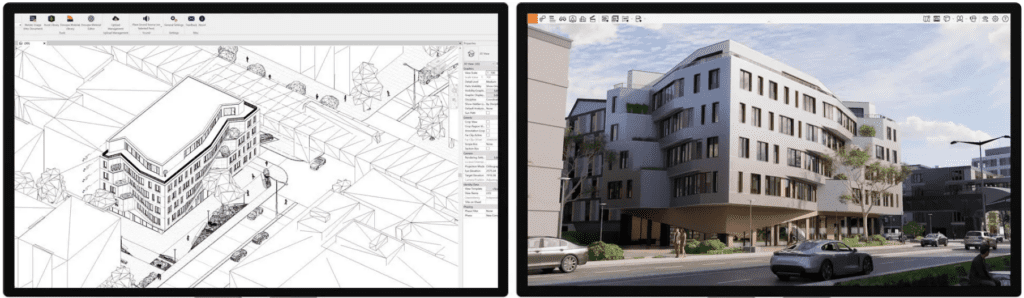
Enscape rendering of a modern building design in Enscape

MINIMAL DATA ENTRY

Users can establish a baseline analysis with just a few data points, including location and building type. This streamlined approach makes it easy to access actionable insights quickly.

VISUAL PERFORMANCE METRICS

Enscape Impact features an intuitive dashboard that displays energy performance metrics through easy-to-read charts and diagrams. This visual representation helps designers understand how their design decisions impact building performance.
ENHANCED COMMUNICATION

By providing clear and concise performance data, Enscape Impact facilitates better communication between architects, engineers, and stakeholders. This ensures that all parties are aligned on sustainability goals and design efficiency.
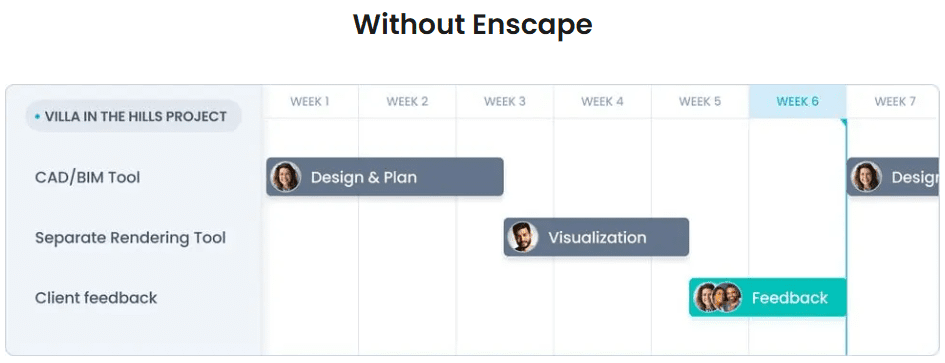
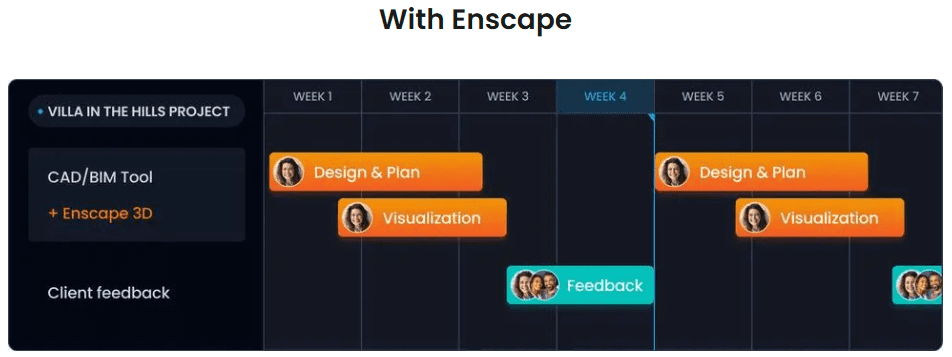
Communication Without Enscape Impact

BENEFITS OF USING ENSCAPE IMPACT

DATA-DRIVEN DECISION MAKING

With real-time energy analysis, designers can make informed decisions that improve building performance and reduce environmental impact. This leads to more sustainable and cost-effective projects.

INCREASED PRODUCTIVITY

The integration of performance analytics into the design workflow shortens the feedback loop, allowing for quicker adjustments and optimizations. This enhances overall productivity and project timelines.

IMPROVED DESIGN QUALITY

By embedding sustainability considerations into the design process, Enscape Impact helps create buildings that are not only aesthetically pleasing but also energy-efficient and environmentally friendly.

By providing real-time insights and seamless integration with existing workflows, Impact ensures that every design decision contributes to a more sustainable future.

Get Quote

Manage Multiple Revit Files

Drawing Manager from RTV Tools may take away some of your pain.

RTV Tools is best known for its RTV Exporter for dealing with weekly document deliverables, allowing your to save presets for Sheets so it becomes a one button exercise (after your visual check). There are many other hidden gems in this Revit Plugin. 

If you have worked long enough on any project with Revit as your main modelling tool, there will be times when you wished some of these mind numbing tasks would just go away. Don’t you wish you could manage all your drawing sheets, your revisions, and transmittals in one place?

Drawing Manager from RTV Tools may take away some of your pain.

RTV Tools is best known for its RTV Exporter for dealing with weekly document deliverables, allowing your to save presets for Sheets so it becomes a one button exercise (after your visual check). There are many other hidden gems in this Revit Plugin. 

RTV Tools Drawing Manager can help streamline managing multiple Revit project files in one location. 

At it’s core is an SQL Database which adds a layer of “protection?” to the Revit database. You will need to Sync with the Revit Project file to commit changes made in Drawing Manager. Which is not a bad thing, allowing for some flexibility for reversing unintentional mistakes.

The other neat tools includes: Long complex numbering systems (which are unavoidable for infrastructure projects, health projects and defense projects..) Revision requirements for construction (with history reports) and Transmittals (that lets you work with complex numbering systems. To name a few.  If you find this is the space you are in why not have a chat with us.

Wish I could do that!
Manage multiple Revit files in one place.

Revit Survey Levels: 4 easy steps

Moving from Autocad to Revit, this and the previous tutorial (Survey Files in Revit in 4 easy steps) is for you.

Survey Levels in Revit in 4 easy steps.

If you are moving from Autocad to Revit, this is for you. (refer previous tutorial Survey Files in Revit in 4 easy steps)

This is the second of a series of tutorials to help you setup your Revit Projects quickly and painlessly; allowing you to work (or display) between Project Levels and Survey Levels.

During Sketch Design phase, detail or feature survey information are seldom available. In this phase we work with project based (Revit Terminology) levels. The numbers are smaller and easier to comprehend.

Come Design Development phase, we receive more detail survey information. We now have Planning requirements. In this phase we set up levels in Revit to show survey levels, while retaining project levels.

Learn to set up levels, using the Relocate Project tool in the Manage tab. 

If you need further explanation about the above method, please do not hesitate to contact us.

Survey Levels in Revit in 4 easy steps.

An easy way to set up Survey Levels in Revit without compromising Project Base Levels.